
You use ChatGPT every day at work. You write emails with it. You create reports with it. You use Copilot to write code faster. You generate images with Midjourney for presentations. AI is part of your daily workflow.
But when you open your resume — none of this is mentioned. Because you don’t know how to list it. Is “ChatGPT” a real skill? Will recruiters take it seriously? Or will they laugh?
Here’s the truth — in 2026, AI skills are not optional on a resume. They’re expected. A 2026 LinkedIn Workforce Report found that job postings mentioning AI skills in India increased by 180% compared to 2024. Companies aren’t just looking for AI engineers anymore. They want marketers who can use AI. Accountants who can automate with AI. HR professionals who can screen with AI.
In this article, I’ll show you exactly how to add AI skills to your resume — whether you’re a developer, marketer, HR professional, or someone with zero technical background.
Which AI Skills Are Most in Demand in 2026 — By Role
AI isn’t one skill. It’s a spectrum — from using ChatGPT for emails to building machine learning models. Where you fall on that spectrum depends on your role.
For Technical Professionals (IT, Data, Engineering)
| AI Skill | Demand Level | Salary Impact |
|---|---|---|
| Machine Learning (Python, TensorFlow, PyTorch) | Very High | 30-50% premium |
| Large Language Models (LLM fine-tuning, RAG) | Very High | 35-60% premium |
| Prompt Engineering (advanced, system-level) | High | 20-35% premium |
| AI/ML Ops (model deployment, monitoring) | High | 25-40% premium |
| Computer Vision / NLP | High | 30-45% premium |
For Non-Technical Professionals (Marketing, HR, Finance, Sales)
| AI Skill | Demand Level | Best Tools |
|---|---|---|
| AI-assisted content creation | Very High | ChatGPT, Gemini, Jasper |
| AI-powered data analysis | High | ChatGPT Advanced Data Analysis, Julius AI |
| AI marketing automation | High | Meta Advantage+, Google Performance Max |
| AI recruitment tools | Medium-High | HireVue, Eightfold AI, Phenom |
| AI financial modelling | Medium-High | ChatGPT, Copilot in Excel, Bloomberg GPT |
According to a 2026 NASSCOM report, 65% of Indian companies now expect non-technical employees to have basic AI tool proficiency. It’s no longer a “nice to have.” It’s becoming a job requirement — like Excel was 10 years ago.
A marketing executive in Mumbai added “AI-Powered Campaign Management (Google Performance Max, Meta Advantage+)” to her resume. Her next interview — the hiring manager specifically said, “We noticed your AI marketing experience. That’s exactly what we need.” She got a 28% salary hike when switching companies. Her colleagues without AI skills on their resumes got standard offers.
Should You Mention ChatGPT on Your Resume — And How
Short answer: Yes — but not just “ChatGPT.”
Writing “ChatGPT” as a standalone skill is like writing “Google” as a skill. It’s too vague. Everyone uses ChatGPT. The recruiter wants to know how you use it professionally.
❌ Wrong way:
Skills: ChatGPT, AI, Machine Learning
✅ Right way:
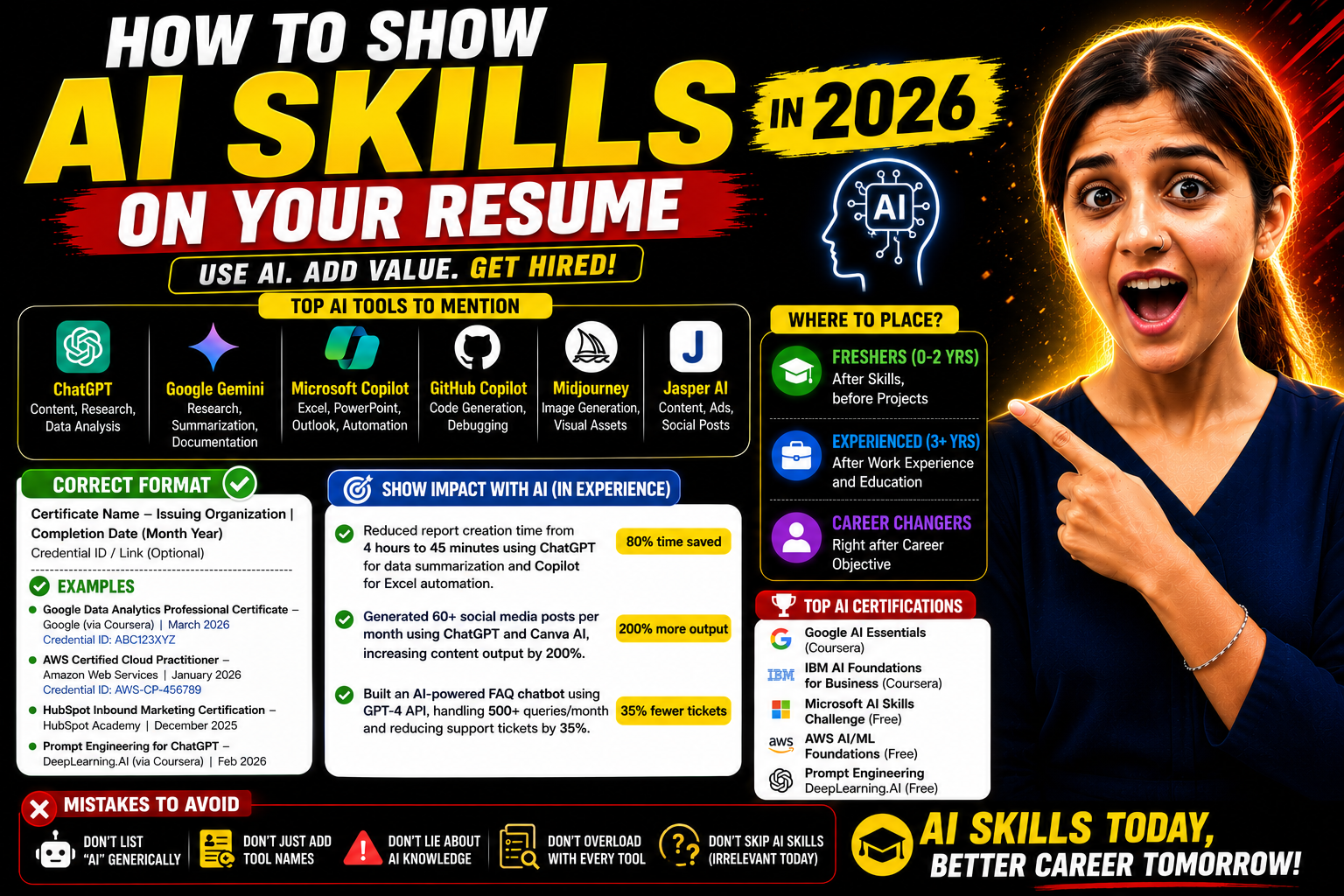
AI Tools: ChatGPT (content drafting, data analysis, report summarization), Google Gemini (research and documentation), GitHub Copilot (code generation and debugging)
See the difference? The second version shows specific professional applications — not just tool names.
Here’s how to mention each major AI tool correctly:
| Tool | How to List It | Best For |
|---|---|---|
| ChatGPT | ChatGPT (content creation, data analysis, customer response drafting) | All professionals |
| Google Gemini | Google Gemini (research, document analysis, summarization) | All professionals |
| GitHub Copilot | GitHub Copilot (code generation, debugging, code review) | Developers |
| Microsoft Copilot | Microsoft 365 Copilot (Excel automation, PowerPoint design, email drafting) | Office workers |
| Midjourney / DALL-E | Midjourney (visual content creation, marketing asset generation) | Designers, marketers |
| Jasper AI | Jasper (ad copy, blog content, social media content) | Content marketers |
| Notion AI | Notion AI (project documentation, meeting notes, knowledge management) | Project managers |
A content writer in Bangalore changed her skills from “Content Writing, SEO” to “Content Writing, SEO, AI-Assisted Content Creation (ChatGPT for drafting, Gemini for research, Jasper for ad copy).” Her LinkedIn profile views jumped by 40% in 2 weeks. Three recruiters messaged her — all mentioned her AI skills as the reason they reached out.
How to Add AI Skills to Your Resume — Step by Step
Step 1: Identify how you actually use AI in your work.
Don’t list AI tools you’ve opened once. List tools you use regularly and can discuss in an interview. Write down every AI-related task you do weekly — drafting emails, analysing data, generating code, creating presentations, automating reports. That’s your real AI skill list.
Step 2: Add AI tools in your Skills section with context.
Don’t just write tool names. Add parenthetical descriptions showing professional use.
Format:
AI & Automation Tools:
- ChatGPT (report drafting, customer email templates, meeting summary generation)
- Microsoft Copilot (Excel data analysis, PowerPoint deck creation)
- Canva AI (social media design, brand asset creation)
Step 3: Show AI impact in your Work Experience or Projects.
This is where AI skills become powerful — when tied to results.
“Reduced weekly report creation time from 4 hours to 45 minutes using ChatGPT for data summarization and Copilot for Excel automation.”
“Generated 60+ social media posts per month using ChatGPT and Canva AI, increasing content output by 200% without additional team members.”
“Built a customer FAQ chatbot using GPT-4 API, handling 500+ queries per month and reducing support tickets by 35%.”
Numbers make AI skills credible. “I use ChatGPT” is a statement. “I reduced report time by 80% using ChatGPT” is an achievement.
Step 4: Add AI certifications if you have them.
Strong AI certifications for 2026:
| Certification | Platform | Cost | Time |
|---|---|---|---|
| Google AI Essentials | Coursera | ₹2,800 | 10 hours |
| IBM AI Foundations for Business | Coursera | ₹2,500 | 10 hours |
| Microsoft AI Skills Challenge | Microsoft Learn | Free | Self-paced |
| DeepLearning.AI Prompt Engineering | Coursera | Free | 1 hour |
| AWS AI/ML Foundations | AWS Skill Builder | Free | 8 hours |
A BCom fresher in Pune completed Google AI Essentials and IBM AI Foundations in 2 weeks. Total cost — ₹5,300. She added both to her resume under “AI Certifications.” She was the only candidate in her interview batch who had AI credentials. She got hired at ₹4.2 LPA — ₹50,000 more than the standard offer for her role.
Step 5: Create an AI-related project — even a small one.
Built a personal budget tracker using ChatGPT? Automated your company’s weekly email newsletter using AI? Created a prompt library for your team? Any project where you applied AI to solve a real problem counts. Describe it like a work project — tools used, problem solved, result achieved.
Industry-Wise AI Skills for Non-Technical Resumes
Marketing Resume:
“AI Tools: ChatGPT (ad copy, blog outlines), Google Performance Max (AI-driven ad campaigns), Jasper (social media content), Midjourney (visual assets). Increased content production by 150% using AI-assisted workflows.”
HR Resume:
“AI Tools: ChatGPT (JD drafting, candidate communication), HireVue (AI-powered video screening), Eightfold AI (candidate matching). Reduced initial screening time by 40% using AI recruitment tools.”
Finance Resume:
“AI Tools: ChatGPT (financial report summarization), Microsoft Copilot (Excel forecasting), Power BI AI Insights. Automated monthly MIS reporting, saving 12 hours per month.”
Sales Resume:
“AI Tools: ChatGPT (proposal drafting, client email personalization), Salesforce Einstein (lead scoring), Lavender AI (email optimization). Improved email response rate by 25% using AI-personalized outreach.”
A finance analyst in Gurgaon had the same resume for 3 years. She added one line — “Automated monthly MIS reporting using Copilot and ChatGPT, reducing preparation time from 16 hours to 4 hours.” That single line got her 3 interview calls in one week. AI impact on resume is that powerful in 2026.
Common Mistakes When Adding AI Skills to Resume
Mistake 1: Listing “AI” or “Machine Learning” without knowing the basics.
A fresher in Hyderabad listed “Machine Learning” because he watched 3 YouTube videos. In the interview, he couldn’t explain what a training dataset is. His credibility collapsed in one question. Only list what you can discuss confidently for at least 5 minutes.
Mistake 2: Treating AI tools as standalone skills without context.
“Skills: ChatGPT, Gemini, Copilot” — this tells the recruiter nothing. How do you use them? For what tasks? With what results? Always add context in parentheses or in your experience section. Tools without application are just names on paper.
Mistake 3: Overloading the resume with every AI tool you’ve touched.
You opened Midjourney once. You tried Claude for 10 minutes. Don’t list them. Stick to tools you use regularly and professionally. 3-5 AI tools listed with clear applications beats 10 tools listed as a vague keyword dump.
Mistake 4: Ignoring AI skills because “I’m not a tech person.”
In 2026, AI is no longer just for engineers. A 2026 World Economic Forum report states that 92% of employers expect all employees to develop AI competency within 2 years. If you use ChatGPT to draft a better email — that’s an AI skill. If you use Copilot to build an Excel model faster — that’s an AI skill. Own it. List it.
Frequently Asked Questions
Q1: Should I mention ChatGPT on my resume?
Yes — but with context. Don’t write just “ChatGPT.” Write “ChatGPT (content drafting, data analysis, report summarization)” to show professional application. Every recruiter knows ChatGPT exists — they want to know how you use it to add value at work. Specific application beats generic tool name.
Q2: Which AI skills are most in demand in 2026?
For tech roles — machine learning, LLM development, and AI/ML Ops. For non-tech roles — AI-assisted content creation, AI-powered data analysis, prompt engineering, and AI marketing automation. Across all fields — proficiency with ChatGPT, Copilot, and Gemini for daily productivity is becoming a baseline expectation.
Q3: Can non-technical people add AI skills to their resume?
Absolutely. If you use ChatGPT for emails, Copilot for Excel, Canva AI for design, or any AI tool for professional tasks — that’s a legitimate AI skill. You don’t need to code to have AI skills. In 2026, 65% of Indian companies expect non-tech employees to have basic AI tool proficiency.
Q4: How to prove AI skills to an employer?
Three ways — list specific AI tools with professional applications in your Skills section, show AI-driven results in your Experience section with numbers, and add AI certifications (Google AI Essentials, IBM AI Foundations). During interviews, be ready to explain one specific example of how AI improved your work output.
Q5: How to learn AI skills for resume quickly?
Start with Google AI Essentials on Coursera (10 hours, ₹2,800). Learn prompt engineering through DeepLearning.AI’s free course (1 hour). Practice using ChatGPT and Copilot for your actual work tasks daily. Within 2-3 weeks, you’ll have enough real experience to list AI skills confidently on your resume.
AI Skills Aren’t the Future Anymore — They’re the Present
Here’s the reality of 2026 — a resume without AI skills is starting to look like a resume without Excel skills looked in 2015. Not disqualifying yet. But noticeably behind.
You don’t need to become an AI engineer. You need to show that you use AI tools to work smarter, faster, and better. That’s what every employer in India is looking for right now.
Open your resume tonight. Add the AI tools you actually use. Add context showing how you use them. Add one AI certification this month. That’s your entire strategy.
The professionals who learn AI aren’t replacing others. They’re becoming irreplaceable themselves.
Show your AI skills. Stay ahead of the curve. 💪